
The Mielscope Visualization System
Show the expertise behind your dentistry.
No other dental imaging device enables the dentist to capture and share such high-quality imagery across so many different situations this easily.
 ▶ Play the overview
Who can use the view
One clinical view. More ways to put it to work.
Help patients understand your recommendation
Showing better clinical information to the patient means they understand faster and are more informed. Patients can ask better questions. This instills greater trust between the dentist and the patient.
Give assistants a shared view
Assistants can see what the dentist sees and anticipate the next step. They are not fighting for visibility, and there is less miscommunication. Procedures move faster.
Teach the details students usually miss
Doctor can create both structured and impromptu education opportunities more easily. Associates can simply sit in the corner and watch the dentist work. Students, associates and staff understand more quickly and more clearly. The practice can scale. For educational groups, your students see your courses as more valuable.
Show referring dentists how a case was handled
Easily provide more comprehensive information so colleagues can see the findings, technique or result you’re describing. Better communication deepens the doctor to doctor relationship, and increases efficiency.
The Yoshida scope
Microscope power you can use while you work.
Move from a wide view to up to 80× with continuous zoom. Autofocus and a large depth of field help keep the image sharp as the view changes.
- Dual adjustable LEDs direct light near the viewing axis.
- A three-axis articulating arm holds the frame independently of your head movement.
- The eyepiece-free design sits above your working area, so you can keep using loupes when you want.
- Touchscreen, thumb and foot controls give you ways to adjust the view during a procedure.
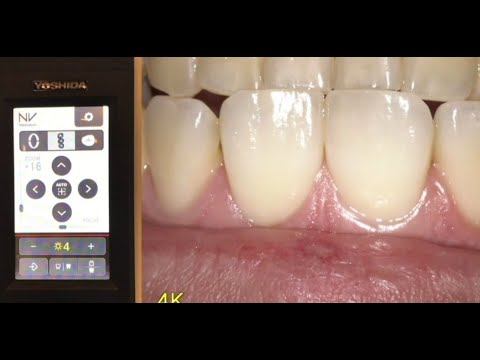 ▶ See magnification in action
Software and integration
Get the footage where it needs to go.
ImageWorks can help configure the Mielscope feed, displays and software around how you want to work, teach and share.
Build the setup around your workflow
- Show the same live view on multiple operatory or training monitors.
- Combine the scope and presenter cameras in a side-by-side live stream.
- Add your practice or course branding to live and recorded video.
- Narrate and edit recordings into short teaching or case review clips.
- Route recordings to approved cloud storage where supported.
Options depend on your equipment, software and configuration.
Discuss your setupCustomer stories
How dentists use Mielscope.
Patient conversations
Reserved for a quote about showing a finding or explaining a treatment recommendation.
Teaching and CE
Reserved for a quote about what students could see in a course or live demonstration.
Working with assistants
Reserved for a quote about how a shared live view changed a specific team workflow.
Procedure capture
Reserved for a quote about capturing a case and sharing it with a colleague.
Compare the workflows
Choose how you want to capture the case.
| Tool | Where it fits | What to consider |
|---|---|---|
| Intraoral camera | Close-up stills for exams and chairside explanations. | A handheld wand takes a hand to position. Field of view, focus and lighting controls vary. |
| Loupe camera | Wearable first-person recording from the clinician’s angle. | The frame follows head movement. Focus and framing adjustments vary by model. |
| Eyepiece microscope | High-magnification optical viewing through binocular eyepieces. | Working position follows eyepiece alignment. Depth of field and video options vary by setup. |
| Dental-light camera | Overhead recording from the existing light mount. | Some models offer 4K and autofocus. Compare working angles, zoom range and lighting control. |
| Mielscope | Stable, independently positioned 4K capture and a shared heads-up view. | Continuous zoom up to 80×, autofocus and adjustable lighting. Sharing workflows depend on the integration. |
Talk with ImageWorks Dental
See how Mielscope would fit your practice.
Tell us what you’d like to show, record or teach. We’ll help you explore the setup for your operatory, team or course.
Prefer to call? 914-592-6100
Mielscope inquiry
Preview of the inquiry form. Submissions are disabled here.