Understanding DICOM and STL in 3D Dentistry
How these two file formats power the world of dental imaging, design, and digital workflows
As dentistry continues its rapid move into digital 3D technology, there’s often confusion about two very different but equally important data formats: DICOM and STL. Both play major roles in 3D dentistry—but they come from completely different origins and serve different purposes.
Understanding what these formats are, what information they contain, and how they work together will help dental teams, service technicians, and labs communicate more effectively and get more value out of their imaging and CAD/CAM technology.
DICOM: The Language of Medical Imaging
DICOM stands for Digital Imaging and Communications in Medicine. It’s been the universal standard for storing and transmitting medical images since the 1980s—long before 3D printing or intraoral scanning existed.
DICOM isn’t just a file format—it’s a complete framework that defines:
How images are stored (for example, CT, MRI, panoramic, or cone beam scans)
How systems communicate (for example, how images are transferred to and from hospital servers or PACS systems)
How metadata is handled (including patient information, date/time, exposure settings, and 3D reconstruction parameters)
In medicine, DICOM ensures that radiographic data from one system can be understood by another, regardless of manufacturer. In dentistry, this same principle applies to cone beam computed tomography (CBCT) scans.
When a dentist performs a CBCT scan, the resulting volume isn’t a single file—it’s made up of hundreds of individual 2D slices, each stored as its own DICOM file. Together, these slices represent the entire 3D volume. Imaging software then reconstructs these slices into a navigable 3D model that can be rotated, sliced, or measured.
For dental offices, this means:
DICOM files contain internal anatomical information—bone density, root morphology, sinus anatomy, and nerve paths.
These files are ideal for diagnosis and treatment planning because they represent true volumetric data, not just a surface model.
They are also the foundation of implant planning software and other advanced imaging applications.
However, the communication protocols that are part of DICOM (used by large hospitals to share images through systems called PACS, or Picture Archiving and Communication Systems) are less relevant to small dental offices. Most dental imaging software simply stores and reads the DICOM data locally.
STL: The Language of 3D Printing and CAD/CAM
The second key file format in modern digital dentistry is STL, which stands for stereolithography. STL has its roots in the world of 3D printing and computer-aided design/manufacturing (CAD/CAM) rather than medical imaging.
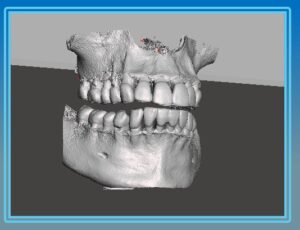
An STL file doesn’t contain slices like a DICOM—it contains a mesh of triangles that describe the outer surface of an object. You can think of it as a digital “skin” that defines shape, but doesn’t include any internal density or structural information.
In dentistry, STL files are most commonly generated by:
Intraoral scanners (capturing the surface geometry of teeth and soft tissue)
Desktop model scanners (used by labs to digitize impressions or models)
CAD software (used to design crowns, bridges, surgical guides, and dentures)
Because STL files describe surfaces, they are ideal for milling and 3D printing. Almost every 3D printer, mill, or guide fabrication system requires STL input.
DICOM vs. STL: Volume vs. Surface
In simple terms, DICOM and STL represent two sides of the 3D imaging world:
| Format | Origin | Type of Data | Typical Use | Strength |
|---|---|---|---|---|
| DICOM | Medical Imaging | Volumetric (internal anatomy) | Cone beam / CT scans | Internal diagnostic detail |
| STL | 3D Printing / CAD | Surface geometry (outer shape) | Intraoral scans, 3D printing, guide design | Surface precision and manufacturing |
A DICOM file lets you “see inside” the anatomy—bone density, sinus cavities, or nerve paths—while an STL file lets you “see the outside”—the contours of teeth and gums.
When a practice or lab plans an implant or creates a surgical guide, both datasets are needed. The DICOM data ensures the implant is correctly positioned in bone, while the STL model ensures the guide fits the surface of the patient’s mouth accurately.
How the Two Formats Work Together
In many cases, dental offices don’t have to manually convert or merge these formats themselves—this is typically handled by dental laboratories or specialized implant planning software. The software aligns the STL surface model from the intraoral scanner with the DICOM volume from the cone beam. This process is known as data registration or data fusion.
However, as more offices move toward in-house 3D printing and chairside workflows, it’s becoming increasingly valuable for dentists and service technicians to understand:
How DICOM and STL data interact
How misalignment can cause surgical guide fit issues
Why file accuracy and export settings matter when sharing data with labs or planning software
For example, if a cone beam scan is taken with metal restorations or movement artifacts, those imperfections can distort the DICOM data and lead to small but significant inaccuracies when the STL surface is overlaid. Understanding the basics of these formats allows dental teams to catch potential problems early.
Why This Matters for Dental Professionals and Technicians
For service technicians and dental office support professionals, understanding DICOM and STL has real-world benefits:
You can communicate more effectively with dentists and labs when troubleshooting workflow or software issues.
You can better support digital integration between imaging systems, CAD/CAM software, and 3D printers.
You can educate clients about the strengths and limitations of their imaging data—building trust and positioning yourself as a knowledgeable partner.
Conclusion
DICOM and STL are two different languages in the digital dentistry world—one designed for seeing inside anatomy, and the other for defining the outside shape. When used together, they bridge the gap between diagnosis and design, allowing clinicians to move seamlessly from seeing the problem to creating the solution.
As 3D workflows continue to expand—from implant planning to surgical guide printing and beyond—understanding how these file formats interact isn’t just for labs anymore. It’s becoming essential knowledge for every modern dental professional and the technicians who support them.
About ImageWorks
ImageWorks helps dental repair technicians excel with advanced imaging systems by offering more than just hardware. We provide proactive education, technical support, and guidance so you can help your dentist customers get the best from their technology.