What is DICOM vs. STL in 3D Dentistry?

Understanding DICOM and STL in 3D Dentistry

How these two file formats power the world of dental imaging, design, and digital workflows

As dentistry continues its rapid move into digital 3D technology, there’s often confusion about two very different but equally important data formats: DICOM and STL. Both play major roles in 3D dentistry—but they come from completely different origins and serve different purposes.

Understanding what these formats are, what information they contain, and how they work together will help dental teams, service technicians, and labs communicate more effectively and get more value out of their imaging and CAD/CAM technology.


DICOM: The Language of Medical Imaging

DICOM stands for Digital Imaging and Communications in Medicine. It’s been the universal standard for storing and transmitting medical images since the 1980s—long before 3D printing or intraoral scanning existed.

DICOM isn’t just a file format—it’s a complete framework that defines:

  • How images are stored (for example, CT, MRI, panoramic, or cone beam scans)

  • How systems communicate (for example, how images are transferred to and from hospital servers or PACS systems)

  • How metadata is handled (including patient information, date/time, exposure settings, and 3D reconstruction parameters)

In medicine, DICOM ensures that radiographic data from one system can be understood by another, regardless of manufacturer. In dentistry, this same principle applies to cone beam computed tomography (CBCT) scans.

When a dentist performs a CBCT scan, the resulting volume isn’t a single file—it’s made up of hundreds of individual 2D slices, each stored as its own DICOM file. Together, these slices represent the entire 3D volume. Imaging software then reconstructs these slices into a navigable 3D model that can be rotated, sliced, or measured.

For dental offices, this means:

  • DICOM files contain internal anatomical information—bone density, root morphology, sinus anatomy, and nerve paths.

  • These files are ideal for diagnosis and treatment planning because they represent true volumetric data, not just a surface model.

  • They are also the foundation of implant planning software and other advanced imaging applications.

However, the communication protocols that are part of DICOM (used by large hospitals to share images through systems called PACS, or Picture Archiving and Communication Systems) are less relevant to small dental offices. Most dental imaging software simply stores and reads the DICOM data locally.


STL: The Language of 3D Printing and CAD/CAM

The second key file format in modern digital dentistry is STL, which stands for stereolithography. STL has its roots in the world of 3D printing and computer-aided design/manufacturing (CAD/CAM) rather than medical imaging.

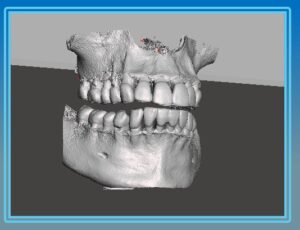
An STL file doesn’t contain slices like a DICOM—it contains a mesh of triangles that describe the outer surface of an object. You can think of it as a digital “skin” that defines shape, but doesn’t include any internal density or structural information.

In dentistry, STL files are most commonly generated by:

  • Intraoral scanners (capturing the surface geometry of teeth and soft tissue)

  • Desktop model scanners (used by labs to digitize impressions or models)

  • CAD software (used to design crowns, bridges, surgical guides, and dentures)

Because STL files describe surfaces, they are ideal for milling and 3D printing. Almost every 3D printer, mill, or guide fabrication system requires STL input.


DICOM vs. STL: Volume vs. Surface

In simple terms, DICOM and STL represent two sides of the 3D imaging world:

FormatOriginType of DataTypical UseStrength
DICOMMedical ImagingVolumetric (internal anatomy)Cone beam / CT scansInternal diagnostic detail
STL3D Printing / CADSurface geometry (outer shape)Intraoral scans, 3D printing, guide designSurface precision and manufacturing

A DICOM file lets you “see inside” the anatomy—bone density, sinus cavities, or nerve paths—while an STL file lets you “see the outside”—the contours of teeth and gums.

When a practice or lab plans an implant or creates a surgical guide, both datasets are needed. The DICOM data ensures the implant is correctly positioned in bone, while the STL model ensures the guide fits the surface of the patient’s mouth accurately.


How the Two Formats Work Together

In many cases, dental offices don’t have to manually convert or merge these formats themselves—this is typically handled by dental laboratories or specialized implant planning software. The software aligns the STL surface model from the intraoral scanner with the DICOM volume from the cone beam. This process is known as data registration or data fusion.

However, as more offices move toward in-house 3D printing and chairside workflows, it’s becoming increasingly valuable for dentists and service technicians to understand:

  • How DICOM and STL data interact

  • How misalignment can cause surgical guide fit issues

  • Why file accuracy and export settings matter when sharing data with labs or planning software

For example, if a cone beam scan is taken with metal restorations or movement artifacts, those imperfections can distort the DICOM data and lead to small but significant inaccuracies when the STL surface is overlaid. Understanding the basics of these formats allows dental teams to catch potential problems early.


Why This Matters for Dental Professionals and Technicians

For service technicians and dental office support professionals, understanding DICOM and STL has real-world benefits:

  • You can communicate more effectively with dentists and labs when troubleshooting workflow or software issues.

  • You can better support digital integration between imaging systems, CAD/CAM software, and 3D printers.

  • You can educate clients about the strengths and limitations of their imaging data—building trust and positioning yourself as a knowledgeable partner.


Conclusion

DICOM and STL are two different languages in the digital dentistry world—one designed for seeing inside anatomy, and the other for defining the outside shape. When used together, they bridge the gap between diagnosis and design, allowing clinicians to move seamlessly from seeing the problem to creating the solution.

As 3D workflows continue to expand—from implant planning to surgical guide printing and beyond—understanding how these file formats interact isn’t just for labs anymore. It’s becoming essential knowledge for every modern dental professional and the technicians who support them.


About ImageWorks

ImageWorks helps dental repair technicians excel with advanced imaging systems by offering more than just hardware. We provide proactive education, technical support, and guidance so you can help your dentist customers get the best from their technology.

Extraoral vs. Intraoral Bitewings: 3 Key Differences Dentists Should Know

As more practices adopt panoramic and cone beam systems with extraoral bitewing capability, it’s important to recognize how these images differ from conventional intraoral bitewings. This video highlights three often misunderstood distinctions that can impact diagnostic precision, from resolution limits to geometric distortion—knowledge that helps both dentists and support professionals make smarter imaging choices.


Take the first step toward better images


    Or give us a call:  914-592-6100


    Learn more about the Mielscope from ImageWorks

    How Dental Equipment Technicians Can Help Dentist Fix a Common Panoramic Complaint

    Why Panoramic X-Rays Don’t Always Capture the Anterior Apices

    A guide for dental repair technicians

    One of the most common complaints you may hear from dentists is that their panoramic x-rays fail to show the anterior apices—both upper and lower. Even when staff work carefully on patient positioning and calibration, certain panoramic systems still struggle to capture this region consistently.

    As a technician, understanding why this happens—and when it’s an equipment limitation rather than an operator error—positions you as a valuable expert to your customers.


    Why This Happens

    Capturing the anterior region is challenging for both anatomical and equipment-related reasons:

    1. Beam Path Through the Spine

      • During anterior scanning, the x-ray beam must travel through the cervical spine.

      • If the unit doesn’t automatically adjust exposure mid-scan, the apices may be underexposed.

    2. Patient Technique

      • Having the patient swallow and press the tongue against the palate can improve visibility of maxillary structures.

      • However, this only helps so much—if the hardware is limited, the apices may remain unclear.

    3. Focal Trough Limitations

      • Panoramic systems capture a U-shaped layer of data known as the focal trough.

      • The anterior region falls into a narrower section of the trough, leaving less margin for error.

      • The emergence profile of anterior teeth also complicates matters—mandibular anteriors often angle dramatically, so crowns and apices don’t fall in the same plane.

    The result? Even with perfect positioning, many panoramic machines simply cannot capture the full anterior anatomy consistently.


    How Advanced Systems Solve This

    Some modern panoramic units address this limitation by capturing multiple focal troughs in one scan. Instead of a single image layer, the system records dozens of slices at varying depths.

    This allows the operator to:

    • Select the “layer” that best shows the anterior apices.

    • Compare multiple views of the same scan without re-exposing the patient.

    • Save several versions to the patient record for better diagnostic flexibility.

    Think of it as handing the dentist a stack of panoramic x-rays from one scan—each one showing slightly different anatomy.


    Technician Talking Points

    When a dentist raises this issue, you can:

    • Acknowledge technique factors (tongue placement, positioning, distance).

    • Explain equipment limitations—many machines can’t overcome the physics of the anterior focal trough.

    • Introduce solutions—highlight that newer panoramic technology with multilayer capture resolves this problem and provides much greater diagnostic value.

    This positions you not only as someone who can fix equipment, but also as a trusted advisor who helps practices understand the why behind their imaging results.


    About ImageWorks

    ImageWorks helps dental repair technicians excel with advanced imaging systems by offering more than just hardware. We provide proactive education, technical support, and guidance so you can help your dentist customers get the best from their technology.


    Make sure you stay updated on the latest in the dental industry by subscribing


      How Dental Equipment Technicians Can Help Their Customers Improve X-Ray Images

      Adjusting X-Ray Darkness: A Guide for Dental Technicians

      Dentists often rely on technicians for answers when radiographs don’t look quite right. A common concern you may hear from your dental office customers is:
      “Why are my x-rays coming out too light or too dark?”

      As a service technician, you can add value by not only ensuring the equipment is functioning properly, but also by helping the office staff understand what affects radiograph quality. This builds confidence in your expertise and strengthens your role as a trusted partner.

      Key Concept: Exposure and Image Darkness

      The most important principle to know—and to explain—is this:

      • Too dark = overexposed (too much radiation reaching the sensor).

      • Too light = underexposed (not enough radiation reaching the sensor).

      Once this is understood, the discussion becomes about identifying what’s causing the over- or under-exposure.


      Common Variables That Affect Image Darkness

      1. Patient Size and Anatomy

        • Larger patients or dense areas (posterior teeth) require more exposure.

        • Smaller patients or anterior teeth typically require less.

      2. Technique and Positioning

        • If the x-ray source is positioned farther away from the sensor, less radiation reaches it, resulting in lighter images.

        • This is especially common with handheld x-ray devices, where consistency in distance is harder to maintain.

      3. Exposure Parameters

        • kVp (voltage), mA (current), and exposure time all affect image darkness.

        • Most systems make exposure time the easiest adjustment. Increasing exposure time darkens the image; decreasing it lightens the image.

        • Always ensure adjustments are within manufacturer limits and in line with ALARA principles.

      4. Software Filters

        • Many imaging platforms allow adjustments using filters like contrast, gamma, or brightness.

        • Some systems auto-correct underexposed images, which can lead to graininess (similar to enlarging a low-resolution photo). If you see this, it often indicates the sensor isn’t receiving enough radiation in the first place.


      How Technicians Can Help

      As a dental technician, you may not be the one capturing images, but you can:

      • Identify technique issues when staff report inconsistent results.

      • Check exposure settings and confirm they are appropriate for the office’s patient population and unit type.

      • Explain the “why” to dentists and staff, giving them confidence that the system is functioning as expected.

      • Guide offices toward consistency—reminding them to keep distances fixed, use recommended parameters, and only rely on filters for fine-tuning.


      Conclusion

      When a dentist says their radiographs look too light or dark, they may assume it’s purely a machine problem. By understanding how exposure, technique, and software interact, you can confidently explain the cause—and, when appropriate, adjust parameters to improve results.

      This positions you not just as an equipment repair specialist, but as an imaging partner who helps offices get the most diagnostic value from their technology.


      About ImageWorks

      ImageWorks helps dental repair technicians excel with advanced imaging systems by offering more than just hardware. We provide proactive education, technical support, and guidance so you can help your dentist customers get the best from their technology.
       

      Make sure you stay updated on the latest in the dental industry by subscribing


        Tooth Prep When Loupes are Missing some Detail

        Some doctors feel that their loupes will only take them so far, and they may be missing details.  They are worried that high-magnification loupes or a traditional dental microscope may be difficult to use, and slow them down.   

        Below is Mielscope footage from a prep utilizing gingival retraction cord.  The doctor was able to comfortably and easily see this detail while he worked because the Mielscope is not connected to the position of his head, and can be easily controlled hands-free. 


        Take the first step toward better images


          Or give us a call:  914-592-6100


          Can Dental Radiographs Indicate Risk of Dementia?

          Can Dental Radiographs Indicate Risk of Dementia?

          Emerging research suggests a significant association between periodontal disease and dementia, including Alzheimer’s disease. A recent large cohort study reported that individuals with periodontitis had nearly double the risk of developing dementia compared to those without periodontal disease (Li et al., 2024). Importantly, these findings highlight a correlation rather than proof of causation—but they underscore the broader systemic implications of oral health.

          The Periodontal–Dementia Link

          Chronic periodontitis involves ongoing inflammation of the gums and supporting structures of the teeth. This condition not only leads to alveolar bone loss, visible on dental radiographs, but also stimulates systemic inflammation. Circulating inflammatory mediators may affect the brain by contributing to neuroinflammation and vascular injury—factors implicated in cognitive decline (Kamer et al., 2020).

          Epidemiological studies consistently show that people with long-term periodontal disease are more likely to be diagnosed with dementia (Chen et al., 2017). Still, the evidence is not conclusive. Some investigations, particularly those relying solely on radiographic measures of bone loss, have failed to detect significant associations (Mauri-Obradors et al., 2018). The consensus today is that while the relationship is biologically plausible and supported by population studies, it remains unproven.

          Why Dental X-rays Matter

          Radiographs are central to detecting and monitoring periodontal disease. Bitewings and periapical films allow dentists to visualize alveolar bone loss—one of the defining signs of periodontitis. While X-rays cannot capture early soft tissue inflammation, sequential imaging can reveal whether bone support is being lost at a faster rate than expected.

          Because radiographic bone loss may reflect a heightened inflammatory burden, these images could also serve as indirect markers of broader systemic risk—including dementia. Dentists who note accelerated or unexplained bone loss may be in a position to discuss not only periodontal treatment but also the importance of systemic health monitoring with patients and their physicians.

          Clinical Implications

          Dentists are often among the most frequent healthcare providers that older adults see. This positions dental professionals to play a unique role in detecting early signs of conditions that extend beyond the oral cavity. While the current evidence does not prove that periodontitis causes dementia, radiographs documenting progressive bone loss could one day contribute to risk stratification and early referral for cognitive screening.

          As research continues, dental X-rays may prove valuable not only for preserving oral function but also for informing broader preventive care. For now, raising awareness of the potential links—while acknowledging the limits of current knowledge—empowers dentists to be part of a larger conversation about whole-body health.


          References

          • Chen, C. K., Wu, Y. T., & Chang, Y. C. (2017). Association between chronic periodontitis and the risk of Alzheimer’s disease: a retrospective, population-based, matched-cohort study. Alzheimer’s Research & Therapy, 9(56).

          • Kamer, A. R., Craig, R. G., Niederman, R., Fortea, J., & de Leon, M. J. (2020). Periodontal disease as a possible cause for Alzheimer’s disease. Periodontology 2000, 83(1), 242–271.

          • Li, H., et al. (2024). Periodontitis and risk of dementia: a prospective cohort analysis. The Lancet Regional Health – Western Pacific. https://doi.org/10.1016/j.lanwpc.2024.100112

          • Mauri-Obradors, E., Jané-Salas, E., Sabater-Recolons, M. M., et al. (2018). Oral health and cognitive impairment: Study of a cohort of patients with dementia. Medicina Oral, Patología Oral y Cirugía Bucal, 23(4), e1–e7.


          About ImageWorks

          ImageWorks is a trusted leader in dental imaging technology, with nearly one billion dental images captured using our systems. Our mission is simple: to empower dental professionals with tools and support that elevate care and efficiency. We focus on helping clinicians:

          • Reveal the most diagnostic information

          • Achieve the most efficient workflow

          • Maintain the lowest total cost of ownership

          Guided by these priorities, we’ve built a comprehensive portfolio of advanced imaging solutions—and, just as importantly, a team of experts dedicated to helping you succeed. From installation and training to ongoing support, we’re here to ensure that your imaging technology delivers lasting value to your practice and your patients.

          Learn More

          Mielscope Restoration Recording

          The Mielscope can help dentists perform restorations with higher precision and less neck pain.  With higher magnification and better visibility, it can help the dentist with:

          • Debridement and cleaning: Thorough removal of decay and debris while preserving healthy tooth structure.
          • Etching and bonding application: Confident placement of bonding agents with full visibility of margins and surface coverage.
          • Layered composite placement: Sculpting composite in small increments with anatomical accuracy and minimal voids.
          • Adaptation to internal walls and margins: Detecting gaps, bubbles, or overhangs that would otherwise go unnoticed.
          • Polishing and finishing: Refining contours and removing flash for a smooth, natural look.
          • Occlusion check under magnification: Identifying and adjusting micro-high spots before the patient ever feels them.
          • Final case photography/video: Capturing high-quality images with no debris or cement — perfect for documentation and marketing.
          Take the first step toward better images


            Or give us a call:  914-592-6100


            Learn more about the Mielscope from ImageWorks

            Can ChatGPT Reliably Read Your Patients’ Cone Beam and Panoramic Radiographs?

            Study finds promise—but accuracy gaps remain for third molar assessment.

            Why This Matters

            Panoramic radiographs remain essential in planning third molar extractions, but interpretation requires skill and context. With patients increasingly turning to AI for instant health answers, researchers at Universidad Europea de Madrid set out to test whether ChatGPT-4o—a multimodal large language model—could accurately interpret lower third molar panoramic radiographs.


            How the Study Worked

            • 30 anonymized panoramic radiographs showing lower third molars were used.

            • Each image was paired with a patient-style prompt:

              “I have had an x-ray to look at my lower wisdom teeth in case I need to have them removed. In a short one-paragraph answer, tell me what you see.”

            • 900 total responses were generated (30 per radiograph).

            • Two oral surgery experts scored each as correct, partially correct/incomplete, or incorrect.

            • A third expert resolved disagreements.


            The Results

            • Overall accuracy: 38.44%

            • Repeatability: 82.7% agreement in repeated responses, but only moderate agreement quality (Gwet’s AC 60.4%).

            • ChatGPT often identified implants, restorations, and orthodontic appliances correctly.

            • It struggled with molar angulation, eruption stage, and overlap with adjacent structures.

            • Occasional “hallucinations” — fabricated findings not supported by the image — were observed.


            Why It’s Different

            Unlike most AI-in-dentistry studies, this one used a natural, patient-style question instead of technical prompts. This more closely reflects how patients might use AI for quick guidance—and highlights the risk of them receiving inaccurate interpretations without professional input.


            How It Compares to Other Research

            ChatGPT’s performance here mirrors other radiology studies, where diagnostic accuracy typically falls between 35% and 50%. Purpose-built convolutional neural networks (CNNs) have achieved higher accuracy for narrow diagnostic tasks, but they require large, well-labeled dental datasets—something still in short supply.


            Implications for Dental Practices

            For now, ChatGPT-4o should be seen as a patient communication tool, not a diagnostic authority. It can help explain concepts in plain language, but cannot replace the trained eye of a dentist in reading panoramic radiographs—especially for nuanced surgical planning.


            Bottom Line

            ChatGPT may one day assist in interpreting panoramic radiographs (and the recent release of version 5 will be interesting to evaluate), but today’s models aren’t accurate enough to guide treatment independently. Dentists should be prepared to both harness and supervise AI—ensuring it supports, not supplants, clinical expertise.


            Make sure you stay updated on the latest in the dental industry by subscribing

              For which procedures is the Mielscope being used?

              For which specific dental procedures is the Mielscope getting used, and how?


              Take the first step toward better images


                Or give us a call:  914-592-6100


                Learn more about the Mielscope from ImageWorks

                Dr. Gupta Dives in with His Mielscope

                Dr. Anurag Gupta implemented his Mielscope about a month ago, and we checked in to see how he was doing.  He gave us his quick feedback: 

                Good morning.  I am getting good at using it now. I have done some procedures without using my loupes. I think I am going to need more of these soon. 

                –Dr. Gupta

                This video looks over his shoulder on his first day using it with very little training.
                Take the first step toward better images


                  Or give us a call:  914-592-6100


                  Learn more about the Mielscope from ImageWorks